
How Camelot compares to other tools#
This page compares Camelot to the most common open-source PDF table-extraction libraries you’re likely to evaluate alongside it. The goal isn’t to claim Camelot is best for every PDF — different tools win on different inputs — it’s to help you pick the right tool for your corpus quickly.
If you’ve already used one of the libraries below, the per-tool sections name the failure modes that drove Camelot’s design choices, plus the kwargs you can reach for when Camelot’s defaults don’t fit your PDFs.
Note
This page was ported from the old GitHub wiki in 2026 and
refreshed against current releases. Each per-tool section ends
with a Last verified: YYYY-MM-DD footer — please open an
issue if you find an entry has drifted out of date.
At a glance#
Click any column header to sort. The Camelot column is highlighted; ✓ means “supported out of the box”, ✗ “not supported”, ◐ “partial / workaround required”.
| Capability | Camelot | Tabula | pdfplumber | PyMuPDF | gmft | unstructured.io | tablers |
|---|---|---|---|---|---|---|---|
| License | MIT | MIT | MIT | AGPL / commercial | MIT | Apache 2.0 | MIT |
| Runtime | pure Python | Java + wrapper | pure Python | C binding | PyTorch model | Python + plugins | Rust + Python |
| Ruled-grid tables | ✓ | ✓ | ✓ | ✓ | ✓ | ◐ | ✓ |
| Borderless / whitespace tables | ✓ | ✓ | ◐ | ✓ | ✓ | ✓ | ✗ |
| Per-page kwarg overrides | ✓ | ✗ | ◐ | ◐ | ✗ | ✗ | ✗ |
| Scanned PDFs (no text layer) | ✓ | ✗ | ✗ | ◐ | ✓ | ✓ | ✗ |
| Neural / model-based structure | ✓ | ✗ | ✗ | ✗ | ✓ | ◐ | ✗ |
| Confidence score per table | ✓ | ✗ | ✗ | ◐ | ✓ | ✗ | ✗ |
| In-memory bytes / file-like input | ✓ | ✗ | ✓ | ✓ | ✓ | ✓ | ✗ |
| Multi-page table stitching | ✓ | ◐ | ◐ | ◐ | ✓ | ◐ | ✗ |
| Heavy native deps | opencv-headless, pdfium | JRE | none | mupdf (vendored) | PyTorch (+ GPU) | varies | none (Rust/pdfium bundled) |
Side-by-side example#
Picking a representative case — agstat.pdf, a ruled multi-row-header table from a US Department of Agriculture report — Camelot and Tabula both detect the table area, but Camelot picks up the merged-header row correctly without manual hinting:
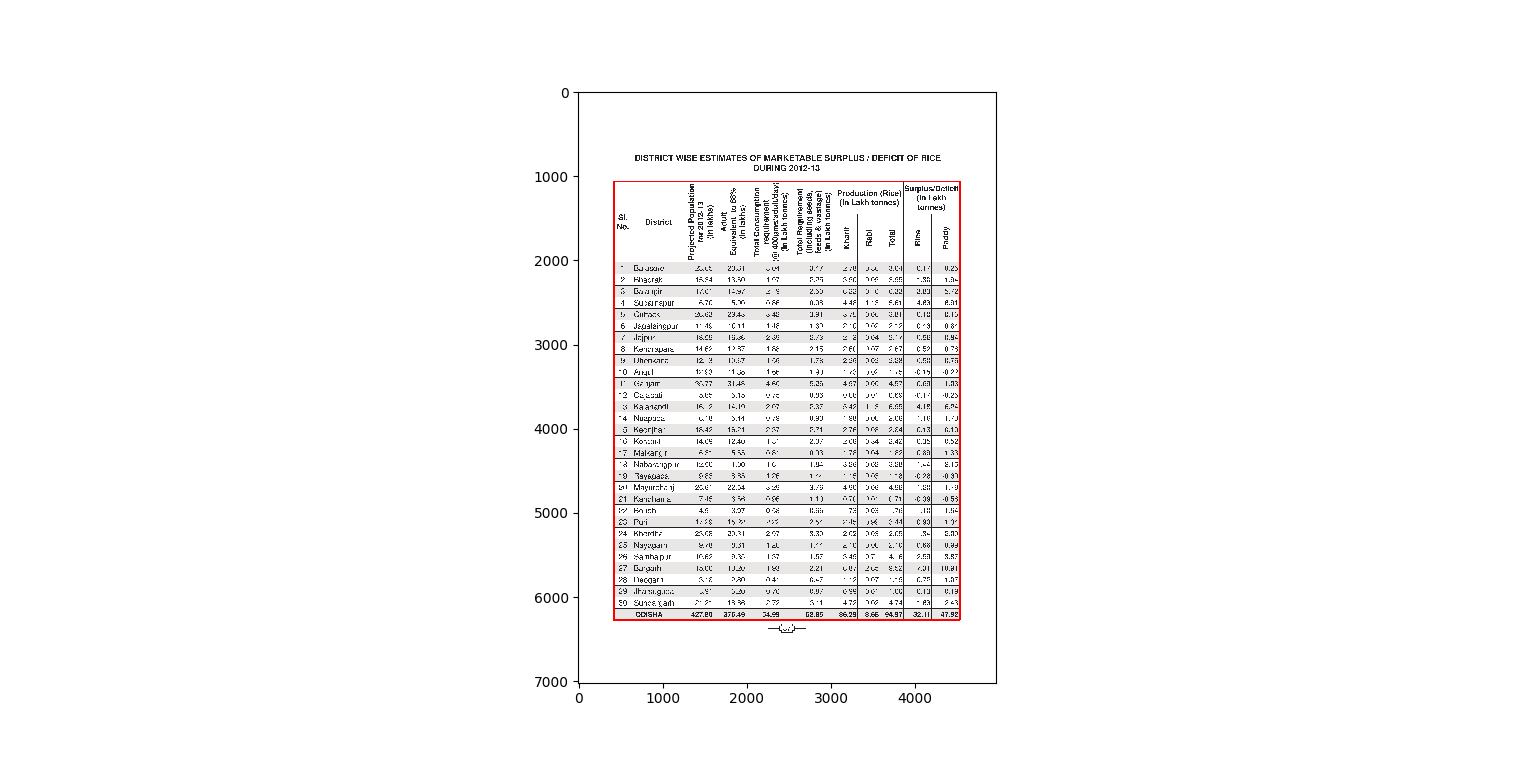
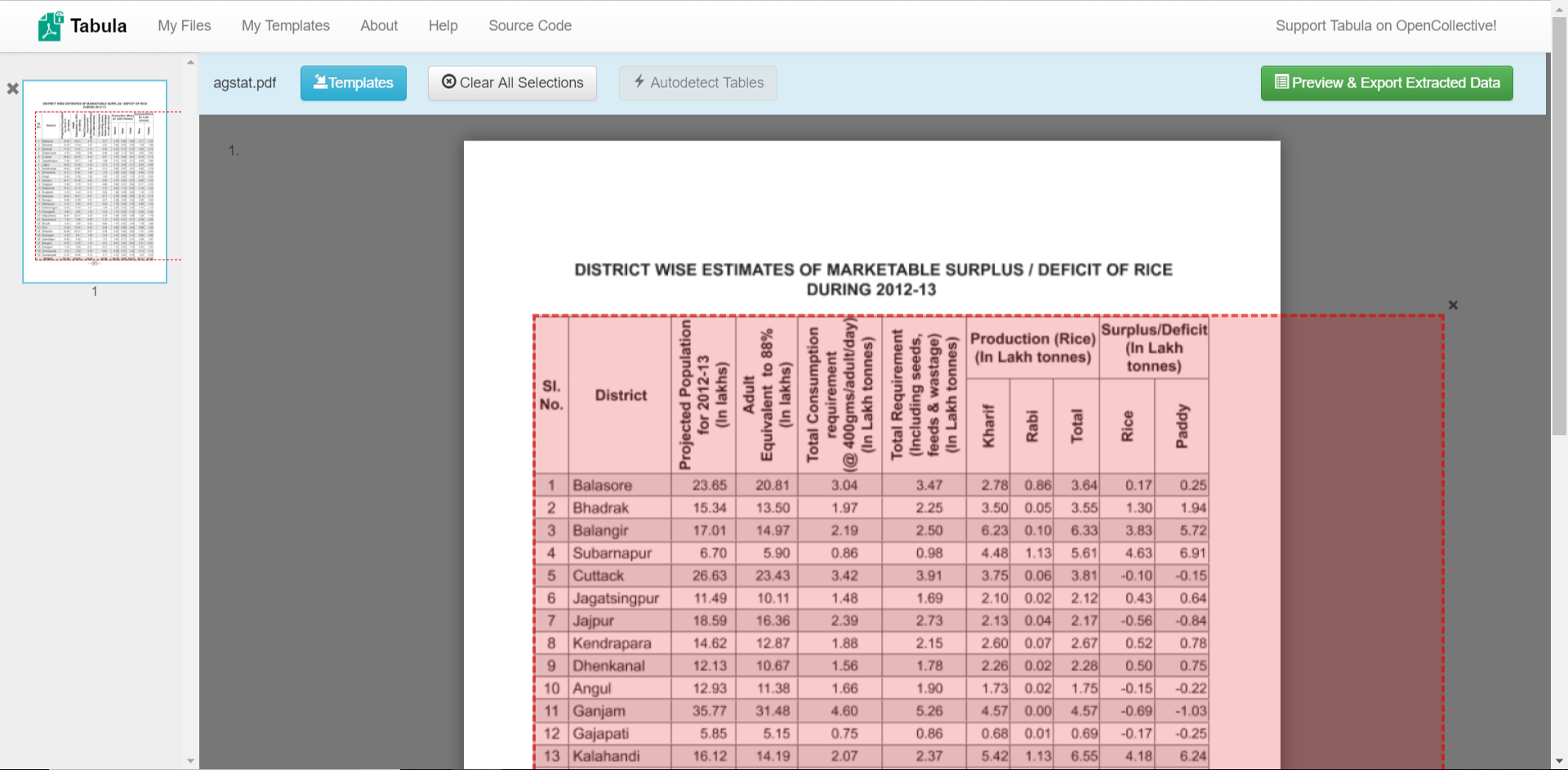
For a quick view of how each tool’s CSV output differs on the same PDF, the docs/benchmark/ directory has per-tool CSVs alongside the source PDF for a dozen test cases (lattice + stream).
Tabula#
Tabula is the most direct
peer to Camelot — Camelot’s flavor='lattice' / 'stream'
naming is in fact borrowed from Tabula. Tabula ships as a Java
library plus a Python wrapper (tabula-py); the JVM dependency is the
biggest difference for deployment.
When Tabula wins. Auto-detection of stream-flavor tables is generally stronger than Camelot’s stream parser — though Camelot’s network and hybrid flavors (added in 1.0) close most of the gap on borderless tables. Tabula’s interactive web UI for manually marking table regions is also unique.
When Camelot wins. Multi-row column headers, merged spanning cells, and tables containing italic/superscript decorations. Camelot’s
copy_text,shift_text,flag_size, andreplace_textkwargs let you fix specific extraction defects without leaving Python.Deployment. Camelot’s pure-Python stack runs in any container that has
opencv-python-headlessandpdfium; Tabula needs a JRE.
Last verified: 2026-05-21 against tabula-java 1.0.5 / tabula-py 2.10.
pdfplumber#
pdfplumber is a layout- analysis library that grew table-extraction features over time. It’s built on pdfminer.six — the same backend Camelot used pre-2.0.
When pdfplumber wins. When you want fine-grained access to every layout primitive (characters, rects, curves), not just the finished table. Pdfplumber exposes the raw layout objects directly, making it the right pick for “I want to find tables and the paragraph headers next to them”.
When Camelot wins. Out-of-the-box table-detection quality on the typical PDF report; per-table quality reports (
parsing_reportwithconfidence); theflavor='hybrid'parser combining lattice + network signals.Backend. Camelot has moved past pdfminer.six to playa-pdf for speed and encrypted-PDF correctness; pdfplumber still tracks pdfminer.six.
Last verified: 2026-05-21 against pdfplumber 0.11.5.
PyMuPDF (built-in tables)#
PyMuPDF added a
Page.find_tables() API in version 1.23 (2023). It’s now a
serious table-extractor backed by the C-level mupdf library.
When PyMuPDF wins. Pure speed on simple ruled tables — rasterising is skipped entirely and the C parser is fast. Also a good pick if you’re already using PyMuPDF for other PDF tasks (rendering, text search) and want to keep one dependency.
When Camelot wins. Stream / network / hybrid flavors for borderless tables (PyMuPDF’s table strategy is geometry-only); per-page parameter overrides; multi-page stitching helper.
License nuance. PyMuPDF is AGPL — pulls open-source obligations into derivative work unless you buy a commercial licence. Camelot is MIT.
Last verified: 2026-05-21 against PyMuPDF 1.24.x.
gmft#
gmft — “Give Me The Formatted Tables” — is a 2024-era tool that runs Microsoft’s Table Transformer neural network for table detection plus structure recognition. A different shape from the rule-based tools above.
When gmft wins. A pure model-first workflow on visually-complex tables — bank statements, forms — where you want the neural network to drive the whole extraction.
When Camelot wins. Heuristic-first by default (predictable, CPU-only, no model weights) — and when you do want a model, Camelot’s optional
flavor='ml'runs the same Table Transformer family but fills cell text from the PDF’s own text layer (or OCR for scans) instead of letting the model emit it, so it can’t hallucinate or alter a value. Plus per-extraction kwargs and a per-tableconfidencescore.Resource cost. gmft always pulls a Table Transformer checkpoint (~hundreds of MB) and benefits from a GPU. Camelot’s core needs neither; that cost applies only if you opt into
camelot-py[ml].
Last verified: 2026-05-21 against gmft 0.4.x.
unstructured.io#
unstructured is a document-preprocessing toolkit aimed at the LLM ingestion pipeline — it parses PDFs (plus DOCX, HTML, etc.) into a stream of typed elements (Title, NarrativeText, Table, …).
When unstructured wins. Mixed-content documents where a table is one element among many and you want all of them in a single pipeline. The OCR / image fallback is built-in via plugins.
When Camelot wins. Table-extraction-only workloads where you want maximum control over each table’s parameters, want a per- table
confidencescore, or need the table as a pandasDataFramerather than a Markdown / HTML serialisation.Output. unstructured returns tables as HTML / text snippets; Camelot returns pandas DataFrames + exporters for CSV / Excel / JSON / SQLite / Markdown.
Last verified: 2026-05-21 against unstructured 0.16.x.
tablers#
tablers is a young, MIT-licensed extractor with its core algorithms written in Rust (exposed to Python via PyO3) and PDF handling through pdfium — so it installs with no external Python dependencies and is built for speed.
When tablers wins. Raw speed on ruled tables — being Rust it is dramatically faster (see below), with lazy page loading for large files. If your PDFs are consistently ruled and throughput is the priority, it’s worth a look.
When Camelot wins. Extraction quality on ruled tables (numbers below), plus breadth Camelot has and tablers doesn’t: borderless / whitespace tables (
stream/network/hybrid), the optional neuralflavor="ml"(incl. scanned PDFs), per-tableaccuracy/whitespace/confidencewithTableList.filter(), multi-page stitching, and pandas-DataFrame output. tablers focuses on edge-detected tables and exports to CSV / Markdown / HTML.
Head-to-head on ruled tables#
On the in-repo ICDAR-2013 set (67 born-digital, ruled-heavy PDFs), scored
with Camelot’s own metrics (bench/benchmark_icdar.py — an independent
MIT implementation; the TEDS here is a difflib cell-text proxy, so read
the columns relatively):
tool / config |
F1 |
TEDS |
row |
col |
time |
|---|---|---|---|---|---|
camelot |
0.778 |
0.789 |
0.762 |
0.829 |
101 s |
camelot |
0.766 |
0.784 |
0.748 |
0.806 |
13 s |
tablers |
0.750 |
0.724 |
0.657 |
0.741 |
1.5 s |
So on ruled tables Camelot’s lattice parser leads tablers on every
quality metric — most notably row/col structure (row 0.762 vs 0.657, col
0.829 vs 0.741). tablers is the speed champion (Rust): ~67× faster than the
combined engine here. Camelot’s render-free engine="vector" narrows
that to ~9× while keeping essentially all of combined’s quality — a good
middle ground when throughput matters but you still want Camelot’s accuracy
and breadth.
Last verified: 2026-05-25 against tablers 0.7.3, via the in-repo ``bench/benchmark_icdar.py`` harness.
Tools we no longer compare against#
The earlier wiki page compared Camelot to two more tools that have since gone dormant; we evaluated current alternatives and dropped them from this page:
pdftables — last release 2014, repository archived. Functional but unmaintained; no Python 3.10+ wheels.
pdf-table-extract — last release 2017, dormant. Useful historical reference for the ruled-line / contour-detection approach but no active maintenance.
If either becomes active again, please open an issue and we’ll add them back.
Keeping this page up-to-date#
Each per-tool section ends with a Last verified: YYYY-MM-DD
marker so drift is visible without having to dig through commit
history. The intent is for one of these to fall out of date — that’s
expected — and for a contributor to refresh it via PR when they
notice. The per-tool prose + capability matrix above are
hand-maintained.
The objective numbers — does each tool run on a given PDF, how many tables it returns, and how long it takes — are produced by a script, so they can be refreshed without editing prose:
$ python bench/comparison.py
That runs Camelot plus every peer extractor that’s importable in the
environment (missing ones are skipped, not errored) against a small
canonical corpus, and writes docs/_static/comparison_bench.csv.
The script measures table-count + timing only, not extraction
quality (which needs per-PDF ground truth — a separate effort).
Wiring it into a release-time CI job that installs the heavyweight
comparators (a JRE for Tabula, PyTorch for gmft, …) so the CSV
refreshes automatically is the remaining follow-up.
For practical recipes that use Camelot’s specific features —
per_page, replace_text, in-memory bytes input,
stack_contiguous for multi-page tables — see the
advanced page.